

Download PrintOnly – Secure Printing Software for USB Printers
Secure Document Printing with PrintOnly: A Must-Have Tool for Sensitive Workflows
In today’s digital-first environment, safeguarding sensitive documents is more critical than ever. PrintOnly emerges as a powerful and reliable solution for organizations and individuals who need to control how and where their documents are printed. Unlike traditional printing software, PrintOnly is engineered specifically for USB-connected printers, ensuring that documents can only be printed on physical hardware and not viewed, edited, or saved digitally. This unique restriction significantly reduces the risk of data leaks, especially in environments like government offices, legal firms, medical institutions, and educational institutions where confidentiality is paramount.
PrintOnly achieves this security by converting documents into a proprietary POF (PrintOnly File) format. These files are designed to be opened and printed only through the dedicated PrintOnlyClient application, which must be installed on the target computer. This dual-layer protection ensures that even if a POF file is shared or intercepted, it cannot be accessed outside the intended printing workflow. The software supports a wide array of common file types, including PDF, Microsoft Word, Excel, PowerPoint, images (JPEG, PNG), and plain text files. This versatility makes PrintOnly suitable for diverse use cases, from issuing secure contracts to distributing confidential reports.
What sets PrintOnly apart is its focus on practical security. It doesn’t just block access—it actively manages print sessions. Users can set a maximum number of prints per device, preventing overuse or unauthorized duplication.
Additionally, the option to embed custom watermark text (e.g., “Confidential” or “For Internal Use Only”) adds another layer of deterrence against misuse. Whether you're a small business owner managing client documents or a university administrator distributing exam papers, PrintOnly gives you full control over your printing process. The software is available for free download, making it an accessible choice for teams of any size.
Key Features and Benefits of PrintOnly for Enhanced Document Security
PrintOnly is packed with intelligent features that go beyond basic printing restrictions. Its core strength lies in its ability to convert documents into secure POF files that are virtually impossible to misuse outside the designated printing environment. This feature alone makes it a top contender among secure printing tools, especially for organizations that handle sensitive or regulated data.
- POF File Format Protection: Documents are converted into a proprietary POF format that can only be opened and printed using the PrintOnlyClient application, eliminating the risk of digital access.
- USB-Only Printing Enforcement: PrintOnly restricts printing to physically connected USB printers, preventing network-based or cloud printing that could expose documents to unauthorized access.
- Print Count Limiting: Administrators can set a maximum number of prints per computer, ensuring documents aren’t endlessly duplicated.
- Custom Watermarking: Add visible or invisible watermarks with customizable text, such as “Confidential” or “Do Not Copy,” to deter unauthorized sharing.
- Portable ZIP Version: A lightweight, standalone ZIP package allows easy transfer across devices without installation, ideal for temporary or on-the-go use.
- Multi-Language Interface: The software supports multiple languages, making it accessible to international teams and users with diverse language preferences.
- Regular Updates & Security Patches: The development team actively maintains the software, ensuring compatibility with new Windows versions and addressing potential vulnerabilities.
Another standout feature is the software’s lightweight design. Despite its robust security features, PrintOnly consumes minimal system resources, ensuring smooth performance even on older or low-end machines. The installation process is straightforward and does not require admin rights in most cases, which is a significant advantage in corporate environments where user permissions are tightly controlled. The interface is clean and intuitive, allowing users to convert files, set print limits, and apply watermarks with just a few clicks.
For IT administrators, PrintOnly offers a centralized approach to document distribution. Instead of relying on complex network policies or third-party solutions, a single POF file can be shared securely, knowing that the content will only be printed once (or as many times as allowed) and never stored or accessed digitally. This makes it ideal for high-stakes scenarios like issuing contracts, distributing exam papers, or sharing internal audits.
How to Install and Use PrintOnly: A Step-by-Step Guide
Getting started with PrintOnly is simple and requires minimal technical expertise. Whether you're using a Windows PC or a Mac (via compatibility tools), the process is designed to be user-friendly and efficient. First, download the latest version from the official website. The software is available as a standalone installer or a portable ZIP package, giving users flexibility based on their needs.
Step 1: Download and Install
Navigate to the PrintOnly download page and choose the appropriate version for your system. If you're using Windows, select the .exe installer. For users who prefer not to install software, the portable ZIP version is ideal. Extract the files to a folder of your choice—no installation required.
Step 2: Launch PrintOnly and Convert Your Document
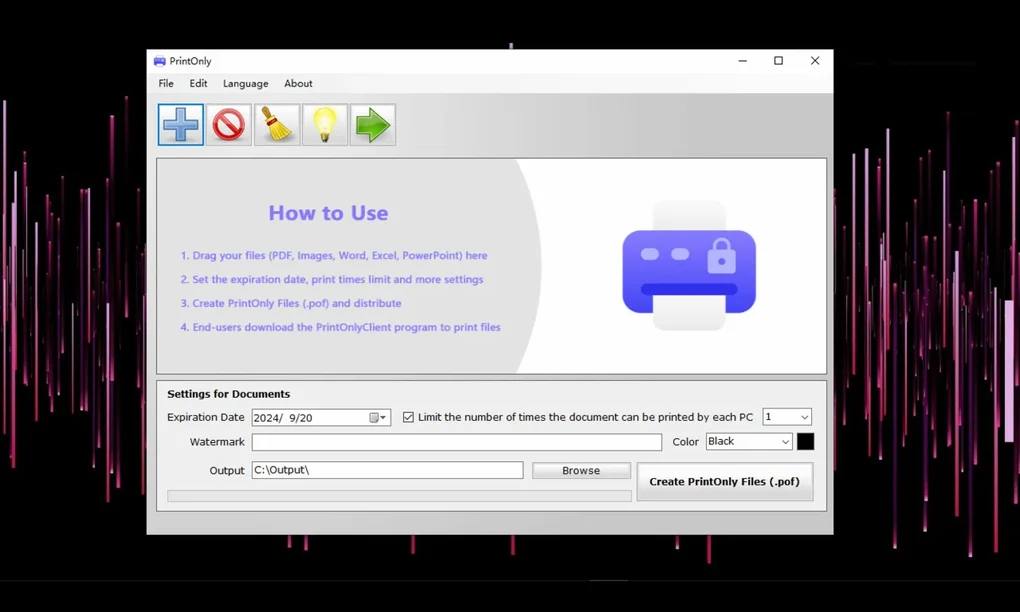
Open the PrintOnly application. Click on “Create POF File” and select the document you wish to secure. Supported formats include PDF, DOCX, XLSX, PPTX, TXT, JPG, PNG, and more. Once selected, the software will prompt you to set printing restrictions, such as the maximum number of prints and whether to add a watermark. You can also choose to include a custom message or expiration date.
Step 3: Share the POF File
After configuring settings, click “Convert.” The software will generate a POF file, which can now be shared via email, USB drive, or cloud storage. This file cannot be opened or edited on any device unless the PrintOnlyClient is installed.
Step 4: Print on a USB Printer
On the recipient’s machine, they must install or run the PrintOnlyClient (included in the ZIP or available separately). Once installed, they can open the POF file, connect a USB printer, and initiate printing. The software will verify the printer connection and proceed with printing only if the conditions are met.
For advanced users, PrintOnly also supports batch processing, allowing multiple documents to be converted at once. This is particularly useful for schools, offices, or event organizers who need to distribute large volumes of secure materials. The entire workflow—from conversion to printing—is designed to be seamless, secure, and efficient.
Frequently Asked Questions (FAQ) – PrintOnly Security & Usage
Is PrintOnly free to download and use?
Yes, PrintOnly is completely free to download and use for personal and professional purposes. There are no hidden fees or subscription models. The software is available under a freemium model, with premium features like advanced reporting and multi-user management available in future updates.
Can I use PrintOnly with non-USB printers?
No, PrintOnly is specifically designed for USB-connected printers. It enforces printing only through physical USB connections to prevent digital exposure. Network or cloud printers are not supported to maintain the highest level of document security.
Does PrintOnly work on Mac and Linux?
PrintOnly is primarily designed for Windows. However, Mac users can run it via compatibility layers like Wine or virtual machines. Linux support is limited but possible through similar methods. For optimal performance, Windows is recommended.
How do I set a print limit for a document?
During the POF file creation process, you’ll find an option to set the maximum number of prints allowed on a single computer. This limit is enforced by the PrintOnlyClient and cannot be bypassed without re-conversion.
Can I remove or edit the watermark after printing?
No, the watermark is embedded directly into the print output and cannot be removed after printing. It is visible on every printed copy and serves as a deterrent against unauthorized duplication or distribution.
Final Verdict: Why PrintOnly Is a Game-Changer for Secure Printing
PrintOnly stands out as one of the most effective and user-friendly tools for secure document printing. Its focus on USB-only printing, combined with the unique POF file format, offers a level of security that traditional software cannot match. Whether you're protecting sensitive contracts, distributing exam materials, or managing internal communications, PrintOnly gives you peace of mind knowing your documents are safe from digital leaks.
While it’s currently limited to Windows, its portable version and lightweight design make it accessible for temporary or shared use. The inclusion of print limits, watermarks, and multi-language support adds significant value for both individuals and organizations. With regular updates and a strong focus on security, PrintOnly is not just a tool—it’s a smart investment in data protection.
Ready to secure your printing workflow? Download PrintOnly today and take the first step toward bulletproof document security.







